Well friends now I am going to share the things on how to increase the speed of the aircel gprs. The main reason for the speed is the type of the phone you use. If you are using an expensive phone then you may want to get a high speed. Apart from this you can also use some softwares such as internet cyclone to boost your speed. It is the best one to improve the speed of aircel gprs. So, use it to increase the speed of aircel gprs.
Some of the features of internet cyclone are;
- Boost your speed to 200% by optimizing your settings
- It is compatible with all type of modems and high speed internet connections such as Lan, Isdn, Cable, Dsl, T1 and others
- You can surf, download and email faster using this software.
Showing posts with label Aircel unlimted internet. Show all posts
Showing posts with label Aircel unlimted internet. Show all posts
Getting Disconnected Suddenly while Using Aircel GPRS
I have seen some people who are facing with some problems such as getting disconnected suddenly while using aircel gprs. The solution for this is very simple. This is because of you might get a call or SMS while you are using the pocket internet. If you still live the problem of disconnecting, the best idea is to restart the phone. Then you will be connected again.
Here is the tip for the korean mobiles: you can just sms PI to 121 to get the settings.
Here is the tip for the korean mobiles: you can just sms PI to 121 to get the settings.
How to Connect Aircel GPRS to PC
Hello friends now I am going to explain how to connect the aircel gprs phone to pc.
Many members are unaware about it and many people might have experienced this problem:
"Error 734: The PPP link control protocol was terminated"
so here it goes
connect your phone using the data cable.
1) Open your PC studio (for samsung other users please use your respective software provided by your phone manufacturer)

2)
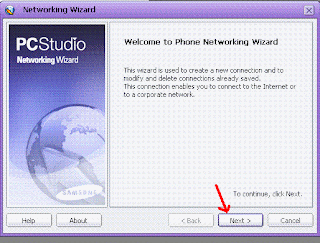
3)

4)
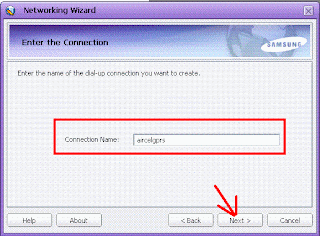
5)

6) Select other country and other network provider(because aircel is not in the list)

7) Click on the properties

8) Enter the phone number as *99***1#
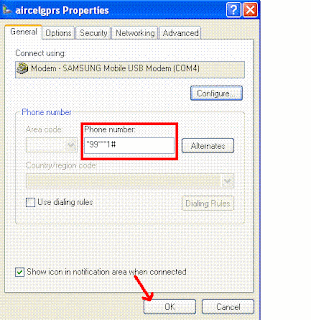
9) Click on dial

10) The internet will be connected like this

Enjoy unlimited browsing in aircel by connecting it to pc.
Many members are unaware about it and many people might have experienced this problem:
"Error 734: The PPP link control protocol was terminated"
so here it goes
connect your phone using the data cable.
1) Open your PC studio (for samsung other users please use your respective software provided by your phone manufacturer)

2)

3)

4)

5)

6) Select other country and other network provider(because aircel is not in the list)

7) Click on the properties

8) Enter the phone number as *99***1#

9) Click on dial

10) The internet will be connected like this

Enjoy unlimited browsing in aircel by connecting it to pc.